

搜索到
4
篇与
的结果
-
 WAP.AC 美国 月付1刀 GIA+9929+CMIN2 VPS评测 总结:目前是三网CMIN2回程,三网效果还不错,老板说路由目前没优化好,调好之后是电信GIA,联通9929,移动CMIN2。各自走各自的高端线路。如果能稳定,性价比不错--------------------- A Bench Script By spiritlhl ---------------------- 测评频道: https://t.me/vps_reviews 版本:2023.10.09 更新日志:VPS融合怪测试(集百家之长) ---------------------基础信息查询--感谢所有开源项目--------------------- CPU 型号 : Intel(R) Xeon(R) CPU E5-2696 v4 @ 2.20GHz CPU 核心数 : 1 CPU 频率 : 2199.996 MHz CPU 缓存 : L1: 64.00 KB / L2: 4.00 MB / L3: 16.00 MB 硬盘空间 : 2.19 GiB / 4.76 GiB 启动盘路径 : /dev/vda1 内存 : 94.87 MiB / 224.12 MiB Swap : 93.08 MiB / 768.00 MiB 系统在线时间 : 0 days, 0 hour 15 min 负载 : 0.31, 0.12, 0.07 系统 : Debian GNU/Linux 11 (bullseye) (x86_64) AES-NI指令集 : ✔ Enabled VM-x/AMD-V支持 : ✔ Enabled 架构 : x86_64 (64 Bit) 内核 : 5.10.0-26-cloud-amd64 TCP加速方式 : bbr 虚拟化架构 : KVM NAT类型 : 开放型 IPV4 ASN : AS7018 AT&T Internet IPV4 位置 : Virginia Beach / Virginia ---------------------CPU测试--感谢lemonbench开源------------------------ -> CPU 测试中 (Fast Mode, 1-Pass @ 5sec) 1 线程测试(1核)得分: 667 Scores ---------------------内存测试--感谢lemonbench开源----------------------- -> 内存测试 Test (Fast Mode, 1-Pass @ 5sec) 单线程读测试: 13793.73 MB/s 单线程写测试: 9743.74 MB/s ------------------磁盘dd读写测试--感谢lemonbench开源-------------------- -> 磁盘IO测试中 (4K Block/1M Block, Direct Mode) 测试操作 写速度 读速度 100MB-4K Block 24.9 MB/s (6082 IOPS, 4.21s) 42.6 MB/s (10401 IOPS, 2.46s) 1GB-1M Block 1.8 GB/s (1684 IOPS, 0.59s) 3.0 GB/s (2851 IOPS, 0.35s) ---------------------磁盘fio读写测试--感谢yabs开源---------------------- Block Size | 4k (IOPS) | 64k (IOPS) ------ | --- ---- | ---- ---- Read | 90.23 MB/s (22.5k) | 383.64 MB/s (5.9k) Write | 90.47 MB/s (22.6k) | 385.66 MB/s (6.0k) Total | 180.71 MB/s (45.1k) | 769.31 MB/s (12.0k) | | Block Size | 512k (IOPS) | 1m (IOPS) ------ | --- ---- | ---- ---- Read | 371.16 MB/s (724) | 281.64 MB/s (275) Write | 390.88 MB/s (763) | 300.40 MB/s (293) Total | 762.04 MB/s (1.4k) | 582.05 MB/s (568) ---------------------流媒体解锁--感谢sjlleo开源------------------------- 以下测试的解锁地区是准确的,但是不是完整解锁的判断可能有误,这方面仅作参考使用 ----------------Youtube---------------- [IPv4] 连接方式: Youtube Video Server 视频缓存节点地域: IAD(IAD30S49) Youtube识别地域: 无信息(null) ----------------Netflix---------------- [IPv4] 您的出口IP完整解锁Netflix,支持非自制剧的观看 NF所识别的IP地域信息:美国 [IPv6] 您的网络可能没有正常配置IPv6,或者没有IPv6网络接入 ---------------DisneyPlus--------------- [IPv4] 当前IPv4出口解锁DisneyPlus 区域:美国区 解锁Youtube,Netflix,DisneyPlus上面和下面进行比较,不同之处自行判断 ----------------流媒体解锁--感谢RegionRestrictionCheck开源-------------- 以下为IPV4网络测试,若无IPV4网络则无输出 ============[ Multination ]============ Dazn: Yes (Region: US) HotStar: Yes (Region: US) Disney+: Yes (Region: US) Netflix: Yes (Region: US) YouTube Premium: Yes Amazon Prime Video: Yes (Region: US) TVBAnywhere+: Yes iQyi Oversea Region: US Viu.com: No YouTube CDN: Washington DC Netflix Preferred CDN: Washington DC Spotify Registration: No Steam Currency: USD ChatGPT: Yes ======================================= 以下为IPV6网络测试,若无IPV6网络则无输出 ---------------TikTok解锁--感谢lmc999的源脚本及fscarmen PR-------------- Tiktok Region: 【US】 -------------------欺诈分数以及IP质量检测--本脚本原创------------------- 数据仅作参考,不代表100%准确,如果和实际情况不一致请手动查询多个数据库比对 以下为各数据库编号,输出结果后将自带数据库来源对应的编号 ipinfo数据库 ① | scamalytics数据库 ② | virustotal数据库 ③ | abuseipdb数据库 ④ | ip2location数据库 ⑤ ip-api数据库 ⑥ | ipwhois数据库 ⑦ | ipregistry数据库 ⑧ | ipdata数据库 ⑨ | ipgeolocation数据库 ⑩ 欺诈分数(越低越好): 0② abuse得分(越低越好): 0④ IP类型: 使用类型(usage_type):business① Data Center/Web Hosting/Transit⑤ education⑧ 公司类型(company_type):hosting⑧ 云服务提供商(cloud_provider): Yes⑧ 数据中心(datacenter): Yes② No⑥ ⑨ 移动网络(mobile): No⑥ 代理(proxy): No① ② ⑥ ⑦ ⑧ ⑨ ⑩ VPN(vpn): No① ② ⑦ ⑧ TOR(tor): No① ② ⑦ ⑧ ⑨ TOR出口(tor_exit): No⑧ 搜索引擎机器人(search_engine_robot): No② 匿名代理(anonymous): No⑦ ⑧ ⑨ 攻击方(attacker): No⑧ ⑨ 滥用者(abuser): No⑧ ⑨ 威胁(threat): No⑧ ⑨ iCloud中继(icloud_relay): No① ⑧ ⑨ 未分配IP(bogon): No⑧ ⑨ Google搜索可行性:YES 端口25检测: 本地: No 163邮箱: Yes gmail邮箱: Yes outlook邮箱: Yes yandex邮箱: Yes qq邮箱: Yes ----------------三网回程--感谢zhanghanyun/backtrace开源----------------- 国家: US 城市: Ashburn 服务商: 北京电信 219.141.136.12 移动CMI [普通线路] 北京联通 202.106.50.1 移动CMI [普通线路] 北京移动 221.179.155.161 移动CMI [普通线路] 上海电信 202.96.209.133 移动CMI [普通线路] 上海联通 210.22.97.1 移动CMI [普通线路] 上海移动 211.136.112.200 移动CMI [普通线路] 广州电信 58.60.188.222 移动CMI [普通线路] 广州联通 210.21.196.6 移动CMI [普通线路] 广州移动 120.196.165.24 移动CMI [普通线路] 成都电信 61.139.2.69 移动CMI [普通线路] 成都联通 119.6.6.6 移动CMI [普通线路] 成都移动 211.137.96.205 移动CMI [普通线路] ---------------------回程路由--感谢fscarmen开源及PR--------------------- 依次测试电信/联通/移动经过的地区及线路,核心程序来自ipip.net或nexttrace,请知悉! 广州电信 58.60.188.222 5.46 ms AS7018 美国 弗吉尼亚州 弗吉尼亚海滩 att.com 12.71 ms * [NEAROUTE3-HK] 美国 加利福尼亚州 洛杉矶 139.51 ms AS58807 [CMIN2-NET] 美国 加利福尼亚州 洛杉矶 cmi.chinamobile.com 移动 142.69 ms AS58807 [CMIN2-NET] 日本 东京都 东京 cmi.chinamobile.com 移动 139.23 ms AS58807 [CMIN2-NET] 中国 上海市 cmi.chinamobile.com 移动 170.62 ms AS9808 [CMNET] 中国 上海市 chinamobile.com 移动 168.84 ms AS9808 [CMNET] 中国 上海市 chinamobile.com 移动 169.70 ms AS9808 [CMNET] 中国 上海市 chinamobile.com 移动 173.68 ms AS9808 [CMNET] 中国 广东省 广州市 chinamobile.com 移动 169.70 ms AS9808 [CMNET] 中国 广东省 广州市 chinamobile.com 移动 170.56 ms AS4134 [CHINANET-BB] 中国 广东省 广州市 chinatelecom.com.cn 电信 175.91 ms AS4134 [CHINANET-GD] 中国 广东省 深圳市 chinatelecom.com.cn 电信 175.65 ms AS4134 中国 广东省 深圳市 福田区 chinatelecom.com.cn 电信 广州联通 210.21.196.6 1.18 ms AS7018 美国 弗吉尼亚州 弗吉尼亚海滩 att.com 0.63 ms * [NEAROUTE3-HK] 美国 加利福尼亚州 洛杉矶 139.80 ms AS58807 [CMIN2-NET] 美国 加利福尼亚州 洛杉矶 cmi.chinamobile.com 移动 143.37 ms AS58807 [CMIN2-NET] 日本 东京都 东京 cmi.chinamobile.com 移动 139.21 ms AS58807 [CMIN2-NET] 中国 上海市 cmi.chinamobile.com 移动 169.67 ms AS9808 [CMNET] 中国 上海市 chinamobile.com 移动 168.69 ms AS9808 [CMNET] 中国 上海市 chinamobile.com 移动 163.65 ms AS9808 [CMNET] 中国 上海市 chinamobile.com 移动 176.00 ms AS9808 [CMNET] 中国 广东省 广州市 chinamobile.com 移动 173.58 ms AS9808 [CMNET] 中国 广东省 广州市 chinamobile.com 移动 179.00 ms AS4837 [CU169-BACKBONE] 中国 广东省 广州市 chinaunicom.cn 联通 176.35 ms AS4837 [CU169-BACKBONE] 中国 北京市 chinaunicom.cn 180.28 ms AS17816 [APNIC-AP] 中国 广东省 深圳市 chinaunicom.cn 联通 185.02 ms AS17623 [APNIC-AP] 中国 广东省 深圳市 chinaunicom.cn 联通 180.07 ms AS17623 [APNIC-AP] 中国 广东省 深圳市 宝安区 chinaunicom.cn 联通 广州移动 120.196.165.24 8.09 ms AS7018 美国 弗吉尼亚州 弗吉尼亚海滩 att.com 0.84 ms * [NEAROUTE3-HK] 美国 加利福尼亚州 洛杉矶 139.69 ms AS58807 [CMIN2-NET] 美国 加利福尼亚州 洛杉矶 cmi.chinamobile.com 移动 146.28 ms AS58807 [CMIN2-NET] 日本 东京都 东京 cmi.chinamobile.com 移动 139.11 ms AS58807 [CMIN2-NET] 中国 上海市 cmi.chinamobile.com 移动 160.50 ms AS9808 [CMNET] 中国 上海市 chinamobile.com 移动 168.98 ms AS9808 [CMNET] 中国 上海市 chinamobile.com 移动 168.71 ms AS9808 [CMNET] 中国 上海市 chinamobile.com 移动 178.08 ms AS9808 [CMNET] 中国 北京市 chinamobile.com 移动 181.98 ms AS9808 [CMNET] 中国 chinamobile.com 移动 183.62 ms AS9808 [CMNET] 中国 北京市 chinamobile.com 移动 180.02 ms AS56040 [APNIC-AP] 中国 广东省 深圳市 chinamobile.com 移动 --------------------自动更新测速节点列表--本脚本原创-------------------- 位置 上传速度 下载速度 延迟 丢包率 Speedtest.net 532.21 Mbps 997.74 Mbps 62.73 0.0% 洛杉矶 1045.48 Mbps 996.25 Mbps 0.96 0.0% 法兰克福 254.22 Mbps 987.35 Mbps 150.69 0.0% 联通成都 11.56 Mbps 51.89 Mbps 176.87 NULL 联通WuXi 12.90 Mbps 13.23 Mbps 160.07 0.0% 电信天津5G 198.83 Mbps 827.96 Mbps 161.87 NULL 电信江苏5G 2.06 Mbps 766.26 Mbps 145.55 0.0% 移动Chengdu 212.56 Mbps 257.81 Mbps 194.57 0.0% ------------------------------------------------------------------------ 总共花费 : 6 分 6 秒 时间 : Mon Oct 16 00:21:33 CST 2023 ------------------------------------------------------------------------
 -
kimsufi ovh等杜甫 DD windows kimsufi ovh等杜甫dd和一般的VPS不通,需要进救援模式。下面是大概步骤步骤1:将你的服务器启动到救援模式,确保选择rescue64-pro,FreeBSD救援系统将无法工作第 2 步:禁用监控并重新启动服务器,然后等待 OVH 向您发送包含救援详细信息的电子邮件步骤 3:使用 PuTTy(或其他一些 SSH 工具)使用救援电子邮件中的用户名和密码连接到您的服务器步骤4:复制下面的命令并将其粘贴到终端中,喝杯咖啡或其他东西,安装需要一些时间,具体取决于服务器的速度步骤 5:完成后,再次启用从 HDD 启动并重新启动服务器,等到它发出 ping 信号后,您就可以使用本文末尾提供的用户名和密码登录dd windowsserver2012R2命令:wget -O- 'https://mirror.joodle.nl/WS2012R2-Joodle-Template.gz' | gunzip | dd of=/dev/sda远程桌面(RDP)账号Administrator 密码Password147其中,https://mirror.joodle.nl/WS2012R2-Joodle-Template.gz为系统包直链该系统在kimsufi法国N2800和i5 2800测试成功还有其他系统包可选,感谢秋水逸冰大佬命令:wget -O- 'DD 镜像链接' | xzcat | dd of=/dev/sdaWindows dd 包来源:用户名: Administrator密码: Teddysun.comRDC(远程桌面) 端口: 5900网络: 必须具备 IPv4 DHCPCPU: 仅限 AMD64 架构,至少单核,双核以上更佳硬盘: 至少 20GB,推荐 50GB 及以上,固态硬盘更佳内存: 至少 2GB , 8GB 以上更佳BIOS 主板固件,MBR 分区Windows 11 Pro for Workstations 22H2简中: https://dl.lamp.sh/vhd/zh-cn_windows11_22h2.xz英语: https://dl.lamp.sh/vhd/en-us_windows11_22h2.xz日语: https://dl.lamp.sh/vhd/ja-jp_windows11_22h2.xzWindows Server 2022 Datacenter简中: https://dl.lamp.sh/vhd/zh-cn_win2022.xz英语: https://dl.lamp.sh/vhd/en-us_win2022.xz日语: https://dl.lamp.sh/vhd/ja-jp_win2022.xzWindows 10 Enterprise LTSC简中: https://dl.lamp.sh/vhd/zh-cn_windows10_ltsc.xz英语: https://dl.lamp.sh/vhd/en-us_windows10_ltsc.xz日语: https://dl.lamp.sh/vhd/ja-jp_windows10_ltsc.xzWindows Server 2012 R2 Datacenter简中: https://dl.lamp.sh/vhd/cn_win2012r2.xz英语: https://dl.lamp.sh/vhd/en_win2012r2.xz日语: https://dl.lamp.sh/vhd/ja_win2012r2.xzUEFI 主板固件,GPT 分区Windows 11 Pro for Workstations 22H2简中: https://dl.lamp.sh/vhd/zh-cn_windows11_22h2_uefi.xz英语: https://dl.lamp.sh/vhd/en-us_windows11_22h2_uefi.xz日语: https://dl.lamp.sh/vhd/ja-jp_windows11_22h2_uefi.xzWindows Server 2022 Datacenter简中: https://dl.lamp.sh/vhd/zh-cn_win2022_uefi.xz英语: https://dl.lamp.sh/vhd/en-us_win2022_uefi.xz日语: https://dl.lamp.sh/vhd/ja-jp_win2022_uefi.xzWindows 10 Enterprise LTSC简中: https://dl.lamp.sh/vhd/zh-cn_win10_ltsc_uefi.xz英语: https://dl.lamp.sh/vhd/en-us_win10_ltsc_uefi.xz日语: https://dl.lamp.sh/vhd/ja-jp_win10_ltsc_uefi.xzWindows Server 2012 R2 Datacenter简中: https://dl.lamp.sh/vhd/cn_win2012r2_uefi.xz英语: https://dl.lamp.sh/vhd/en_win2012r2_uefi.xz日语: https://dl.lamp.sh/vhd/ja_win2012r2_uefi.xz
-
255.255.255.255子网掩码的VPS可以使用的DD脚本 一些杜甫和VPS dd系统遇到报错无法联网现在很多服务器在dd系统时无法成功获取网络。经查,这些商家清一色子网掩码为255.255.255.255,且网关和IP不在一个段上。常见的有hetzner,spaceberg还有最近新出的crunchbits。这种情况会导致debian默认的安装器认为网络配置错误,无法继续经过研究,找到了一个无视子网掩码报错的dd脚本。大佬非常nb原贴:https://hostloc.com/thread-1191827-1-1.htmlhttps://hostloc.com/thread-1196062-1-1.htmlwget --no-check-certificate -qO InstallNET.sh 'https://raw.githubusercontent.com/leitbogioro/Tools/master/Linux_reinstall/InstallNET.sh' && chmod a+x InstallNET.sh bash InstallNET.sh -debian 12
-
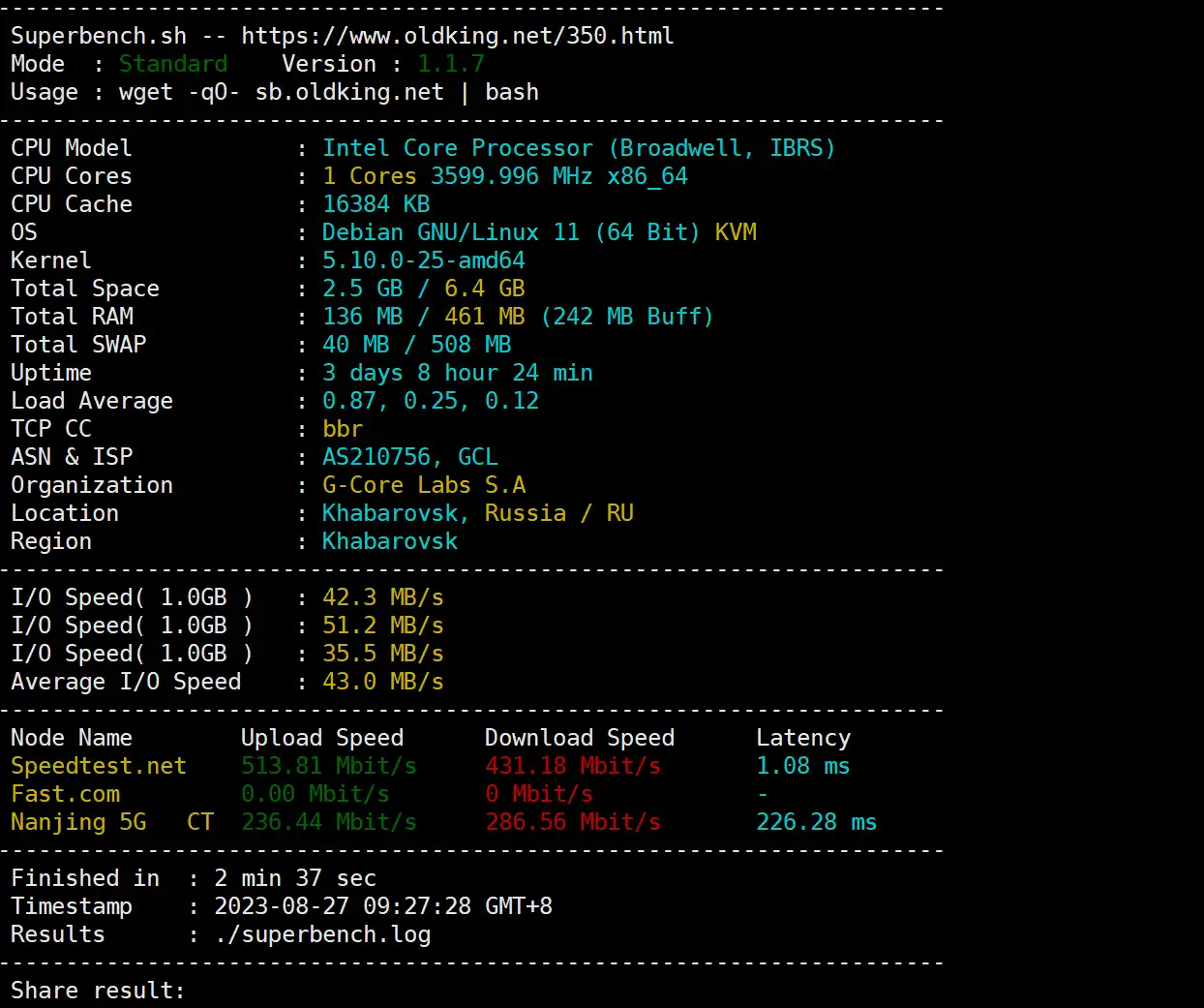
常用VPS测试脚本 {lamp/}对于一个合格的mjj来说,购买VPS之后的评测必不可少。但是评测脚本都分散在各大论坛(比如hostloc.com,nodeseek.com等等)、Github甚至个人博客中,使用起来需要四处寻找,十分不便。在此整理一份常用的VPS评测脚本,方便自己,也方便大家。DD系统原帖:https://hostloc.com/thread-1159839-1-1.html国外:wget --no-check-certificate -qO InstallNET.sh 'https://raw.githubusercontent.com/leitbogioro/Tools/master/Linux_reinstall/InstallNET.sh' && chmod a+x InstallNET.sh国内:wget --no-check-certificate -qO InstallNET.sh 'https://gitee.com/mb9e8j2/Tools/raw/master/Linux_reinstall/InstallNET.sh' && chmod a+x InstallNET.shDD成debian11:bash InstallNET.sh -debian 11密码:LeitboGi0ro备用:wget --no-check-certificate -O AutoReinstall.sh https://git.io/AutoReinstall.sh && bash AutoReinstall.sh增加swap空间wget https://www.moerats.com/usr/shell/swap.sh && bash swap.sh开启BBR加速:wget -N --no-check-certificate -q -O install.sh "https://raw.githubusercontent.com/wulabing/V2Ray_ws-tls_bash_onekey/dev/install.sh" && chmod +x install.sh && bash install.shSuperBench.sh 测VPSwget -qO- --no-check-certificate https://raw.githubusercontent.com/oooldking/script/master/superbench.sh | bash流媒体解锁测试:bash <(curl -L -s https://raw.githubusercontent.com/lmc999/RegionRestrictionCheck/main/check.sh)ARM架构使用此docker:docker run --rm --net=host lmc999/regioncheckChatGPT解锁检测:bash <(curl -Ls https://github.com/ludashi2020/OpenAI-Checker/raw/main/openai.sh)传统四网TCP回程测试:wget -O jcnf.sh https://raw.githubusercontent.com/Netflixxp/jcnfbesttrace/main/jcnf.sh && chmod +x jcnf.sh && clear &&./jcnf.sh新四网TCP回程测试(支持IPv6):wget https://raw.githubusercontent.com/vpsxb/testrace/main/testrace.sh -O testrace.sh && bash testrace.sh全功能国际/国内/单线程/多线程网络测试:bash <(curl -sL bash.icu/speedtest)增加SWAP空间:wget https://www.moerats.com/usr/shell/swap.sh && bash swap.sh套WARP:wget -N https://raw.githubusercontent.com/fscarmen/warp/main/menu.sh && bash menu.sh融合怪测试:bash <(wget -qO- --no-check-certificate https://gitlab.com/spiritysdx/za/-/raw/main/ecs.sh)移除virtio_balloon模块:rmmod virtio_balloon装Dockercurl -sSL https://get.docker.com/ | sh测试 25 端口开启telnet smtp.aol.com 25GB5 性能测试bash <(curl -sL gb5.top)或者curl -sL yabs.sh | bash -s -- -5GB6性能测试wget -qO- yabs.sh | bash不测iperfcurl -sL yabs.sh | bash -s -- -i测试IPv4/IPv6的优先级curl ip.p3terx.com多功能网络测速脚本bash <(curl -sL https://raw.githubusercontent.com/i-abc/Speedtest/main/speedtest.sh)双栈服务器设置IPV4优先sed -i 's/#precedence ::ffff:0:0\/96 100/precedence ::ffff:0:0\/96 100/' /etc/gai.conf